Orbit OS Platform
Orbit OS is a platform that runs on top of embedded Linux. It gives every device the layer that embedded teams usually rebuild for each product — hardware access, application lifecycle, security, updates and remote access — so you only write the application.
The platform has three parts:
- Orbit OS, on the device. Gravity RT runs and isolates your apps — signed .orb packages that get only the permissions they ask for — and gives them one API for the hardware: GPIO, PWM, I²C, SPI, UART, camera, Wi-Fi, Ethernet, Bluetooth and on-device AI (TFLite and ONNX).
- SDKs and tools. SDKs for Go, Java and Python (C++ planned for Q4 2026), the
Orbit Studio extension for VS Code, and Developer Mode: run your code on your laptop
against the real device, with live logs, and build the
.orbonly when it's ready. The same API works in development and in production. - Orbit OS Cloud Services — optional. The Store to publish apps and install them on your devices, OTA updates for apps and for the system, push notifications from your apps to your phone with a single API call, Orbit Connect for remote access without opening ports on your router, and the Hardware Certification Program for manufacturers. The mobile app brings them to your phone. A device runs its apps without any of them.
Core principle: one runtime, one API, for every device, every language, every use case.
System Overview
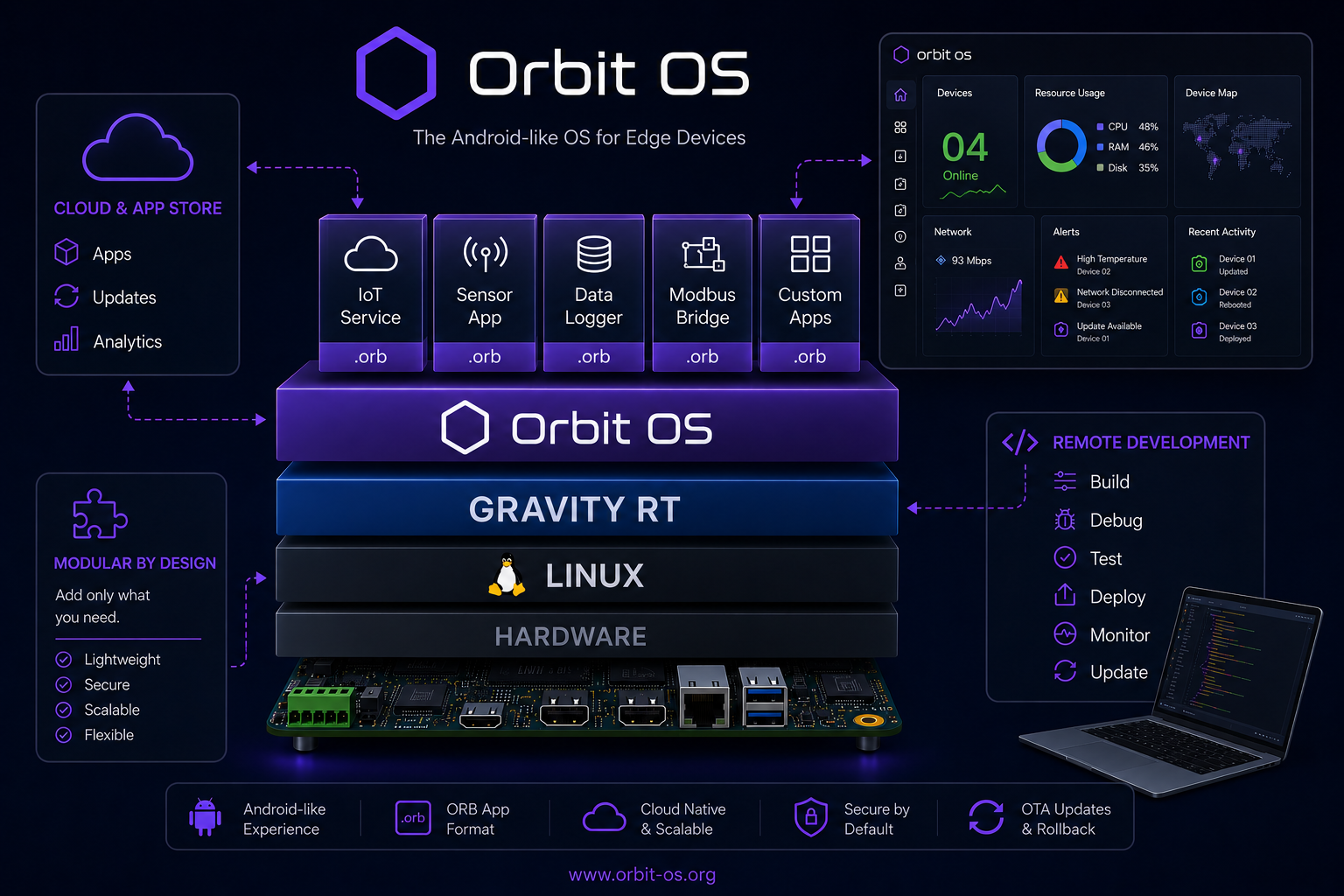
The diagram below shows the full Orbit OS stack — from hardware up through Gravity RT, the application layer, and the remote management plane.
⚙️ Gravity RT
Gravity RT is the execution core of Orbit OS — the single layer through which all applications and system services run. It is always active, extremely lightweight, and acts as the supervisor for everything on the device.
- Application lifecycle: start, stop, restart, and update every
.orbapp - Automatic recovery: crashed apps are restarted automatically
- Hardware access: all device capabilities exposed as a unified, secure API
- Security enforcement: every package verified before execution
- Edge AI: TFLite and ONNX runtimes included by default — no add-on required
Every app runs under Gravity RT — there is no way for an app to bypass it.
📦 .orb Package Model
All software on Orbit OS is distributed as .orb packages —
the equivalent of an APK on Android. A .orb can be an application, a background service, or a system tool.
What's inside a .orb
- Executable code — Go, Python, or Java (C++ planned for Q4 2026)
- Manifest — declares the app's runtime and permissions
- Resources — data files, AI models, configuration, assets
- Cryptographic signature — required for execution
Self-contained and efficient
A .orb bundles everything the app needs. As an example, a full Edge AI face recognition app —
including three TFLite models for detection, landmarks, and identification — weighs only 6 MB.
The TFLite and ONNX runtimes live in the OS, not in each package, keeping sizes small.
Persistent data
Each app has its own isolated data directory that survives restarts and OTA updates. One app cannot access another app's data. Developers have full control — the runtime never deletes app data automatically.
Every .orb is signed. Packages without a valid signature are rejected before execution.
🔑 Permissions
Every .orb declares the hardware and system capabilities it needs in its manifest.
Gravity RT reads this list at launch and exposes only those APIs to the app —
nothing more. This is the principle of least privilege, applied natively.
Examples of available permissions:
- GPIO, PWM, I²C, SPI, UART
- Wi-Fi, Ethernet, Bluetooth (BLE)
- Camera
- AI Service (TFLite & ONNX inference)
- Package Manager
- Firewall
An app that only declares CameraService and AiService has no access
to GPIO, Wi-Fi settings or any other device API — by design, not by configuration.
🔐 Trust Model
Every .orb belongs to one of two signing domains. The signing domain determines
how the package is treated at runtime.
🏪 Store-Signed
Production
Apps distributed through the Orbit OS Store, signed by the official pipeline.
- Fully trusted execution
- Eligible for automatic updates
- Fleet deployment enabled
🧪 Dev-Signed
Development
Apps built locally with the SDK for development and testing purposes.
- Valid and verifiable
- Debuggable on-device
- No fleet deployment
The trust level is determined by the signature, not by configuration. There is no way to promote a dev-signed package to production — it must go through the Store pipeline.
🔒 Security
Security in Orbit OS is not a layer added on top — it is built into the execution model. Every connection is authenticated, every package is verified, and every app runs with only the permissions it declared.
Before any app runs
Gravity RT always performs these steps before execution:
- Verify the cryptographic signature
- Validate the certificate chain
- Classify the trust domain (Store or Dev)
- Apply device policies
- Enforce declared permissions
Remote connections
All remote access — from the SDK, CLI, or mobile app — requires mutual authentication. Nothing is accessible without authentication, and there is no implicit trust. In production, both a valid certificate and credentials are required. In Developer Mode, credentials are not required, but the cryptographic certificate still is.
Developer Mode security
Developer Mode is enabled manually in device Settings — the same model as Android's USB Debugging. The device explicitly informs the user of the security implications when enabling it. Turn it off on devices in production.
Zero compromise on production security. Zero friction in development.
Execution outcomes
🟢 Production
Store-signed .orb. Full managed lifecycle. Fleet deployable.
🟡 Development
Dev-signed .orb. Debuggable. No fleet deployment.
❌ Rejected
Invalid or missing signature. Package is never executed.
🖥️ Launcher
The Launcher is the device's home screen, in the browser. Open http://<device-ip> from any computer
or phone on the same network, sign in with the device login, and you see an icon for every installed app.
Click an icon and the app's web interface opens — no extra software needed.
- One device login — apps that register their web page with the Launcher are served behind it
- Settings is always there: device configuration, network, apps, firewall, updates and Developer Mode
- New apps appear automatically — install from the Store and the icon shows up
🧪 Developer Mode
Developer Mode changes how you interact with your device during development. Instead of the traditional embedded cycle — write, compile, flash, reboot, observe — Orbit OS lets you develop entirely on your laptop against real hardware, in real time.
Traditional embedded workflow
Write code → Compile → Deploy → Reboot → Observe → Repeat
Orbit OS Developer Mode
Write code → Your code connects to device → Call real device APIs → Observe → Repeat
Your code runs on your development machine and connects to the real device over the network. From your laptop, your code calls device APIs — you can remotely activate GPIO pins, run AI inference, configure networking, access the camera, and use any other device capability — all through the same API that production apps use. No packaging, no deploying, no rebooting needed.
Only once the behavior is validated do you generate the .orb and install it locally or publish it to the Store.
- Same API in development and production — no surprises when shipping
- Logs stream in real time, with filtering by tag and level (similar to Android logcat)
- No SSH required — all access goes through the Gravity RT API
- Enabled and disabled explicitly in device Settings
This is the same shift that happened with browser DevTools for web and live reload for mobile — now available natively for embedded Linux.
🔌 Execution Model
All interactions with Gravity RT — whether from an app running on the device or a tool running on a remote laptop — go through the same system API. The origin differs; the model does not.
| Channel | Origin | Usage |
|---|---|---|
| External | SDK, CLI, mobile apps, external tools | Remote development, device control, monitoring |
| Internal | .orb applications and system services |
Production execution on-device |
Because both paths use the same API, code written and tested via the external SDK in Developer Mode
behaves identically when deployed as a .orb and running internally in production.
🛠️ SDKs
The Orbit OS SDK lets you build applications, connect to devices, and control hardware from your language of choice. All SDKs expose the same API — generated from a shared interface definition — so behavior is consistent across languages.
Apps and tools
| Language | Status |
|---|---|
| Go | Available |
| Java | Available |
| Python | Available |
| C++ | Planned Q4 2026 |
* These languages support both building internal .orb apps that run on the device and CLI/tools that interact with the device remotely.
Mobile tools
| Language | Status |
|---|---|
| Android Kotlin | Available soon |
| iOS Swift | Planned Q4 2026 |
* SDKs for building Android and iPhone apps that connect to and control Orbit OS devices remotely.
Full reference for all services, permissions, and device APIs: API Reference →
Orbit Studio
Orbit Studio is the official Orbit OS extension for VS Code. It takes you from an empty folder to an app running on your device without leaving the editor, in Go, Java or Python. It's free on the VS Code Marketplace.
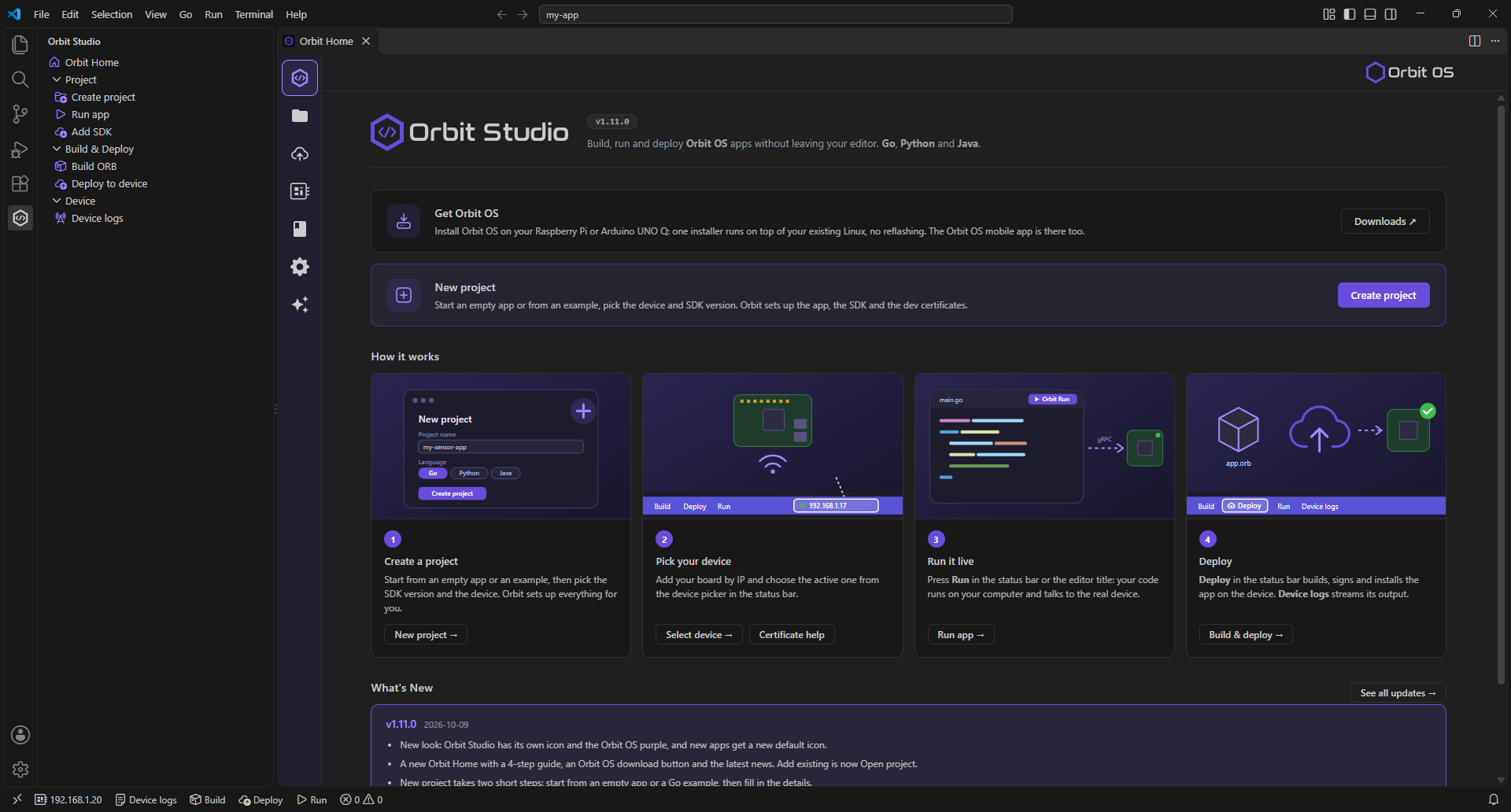
- New project — start from an empty app or, in Go, from one of the Orbit OS examples (GPIO, I²C, PWM, UART, network, camera, notifications, web UI…); Orbit Studio adds the SDK and the development certificates
- My projects — all your Orbit projects in one list; open a project you cloned and it's set up for you
- Run — your code runs on your computer against the real device, in Developer Mode
- Deploy — build, sign and install the
.orbon the device in one step - Device logs — follow your app's logs live, straight from the device
- Python without setup — Python projects need no Python on your computer; Orbit Studio prepares the environment
The step-by-step guide is in Getting Started.
🧠 Developer Workflow
The full lifecycle from development to production deployment:
- Enable Developer Mode on the device (Settings → System → Security)
- Write and run your code from your PC against the device — no packaging needed
- Iterate in real time — logs and results stream back instantly
- Package as .orb once behavior is validated
- Submit to the Store and deploy to your devices
The same device API used during development is the same API running in production. What you test is exactly what ships.
🏪 Orbit OS Store
Everything in this group — the Store, OTA updates, push notifications, Orbit Connect, the mobile app and Hardware Certification — is part of the Orbit OS Cloud Services. They are optional: a device runs its apps without them.
The Store is the central control plane for distributing and managing applications across Orbit OS devices. It handles the full application lifecycle — from first install to updates and OTA system upgrades.
The Store is live at store.orbit-os.org.
For developers
The Store includes a developer portal where you can submit your own .orb apps,
manage versions, and distribute to users.
🖥️ Fleet Management
The Store provides fleet-level control over all your devices from a single interface. Deploy an app to one device or to your entire fleet with a single action.
How fleet deployment works
When installing an app from the Store, a device selector shows all devices in your account. Devices that already have the current version are shown as up to date — preventing unnecessary reinstalls. You can deploy to individual devices or select all eligible devices at once.
- Deploy to any subset of your registered devices
- Version tracking per device — always know what's running where
- Automatic app updates when new versions are published
- OTA system updates managed centrally — enable or disable per device
Fleet management works the same whether you have 1 device or 1,000. The model scales without changing the workflow.
🔄 OTA Updates
Orbit OS has two types of over-the-air updates. Both are delivered through the Store, and can also be installed locally from Settings.
.orb — App update |
.orbit — System update |
|
|---|---|---|
| What it updates | A single application | The Orbit OS system: Gravity RT, system services and the Settings app |
| Published by | Any developer | Orbit OS team only |
| Impact | Only the updated app restarts | Runtime restarts — all apps relaunch automatically |
| Android equivalent | APK update | OS update |
What system updates don't touch
On the Community Edition, Orbit OS runs on top of your existing Linux (Debian or Ubuntu).
The kernel and the distribution's packages are updated the usual way for that distribution,
for example with apt.
Atomic and safe
System updates are atomic — they either apply completely or not at all. If anything goes wrong, the device returns to the previous version.
Soft restart
A system update does not reboot the underlying Linux system — only the Gravity RT process and its apps are restarted. This makes updates significantly faster than a full device reboot.
Auto OTA
Auto OTA can be enabled or disabled per device in the Store. When enabled, the Store delivers system updates automatically as they are published. When disabled, updates are applied manually at the operator's discretion.
🔔 Push Notifications
Any app on the device can send a push notification to its owner's phone with a single API call
(MobileNotificationService, API 26.1). There is no notification backend, push service or
account handling to build — Orbit OS delivers it.
- Notifications arrive in the Orbit OS mobile app, on the phones signed in to the device's account
- Available on Android today; iPhone (iOS) coming soon
- Turned on per device, in Settings → Notifications
 Remote Access — Orbit Connect
Orbit Connect is a free app in the Store that gives each device its own private web address. Open the device's Launcher and its apps from anywhere — no VPN, no open ports and no router changes.
The device opens the connection to the Orbit Connect service itself, so nothing has to reach it from outside your network. The device login still applies.
📱 Mobile App
The official Orbit OS app for Android and iPhone puts your devices in your pocket:
- Your devices — manage the devices in your account, and install or remove apps remotely
- Store — browse apps and install them on your devices from your phone
- Notifications — receive the push notifications your apps send
Available as a direct download (APK) on the Downloads page; Google Play is pending approval, and the iPhone app is coming soon. With the mobile SDKs (Android Kotlin available soon, iOS Swift planned for Q4 2026), you will also be able to build your own apps for Orbit OS devices — custom dashboards, control panels or smart home interfaces.
✅ Hardware Certification
For manufacturers that build dedicated hardware for a product. The Hardware Certification Program validates the device end to end — hardware access, a signed board profile, the trust chain and OTA — and makes it an Orbit OS Certified device.
Certified devices get the Works with Orbit OS badge, a listing in the ecosystem and engineering support for bring-up. The program is free for manufacturers. Learn about the program →
📊 Footprint
Orbit OS is designed to run on resource-constrained edge devices — not just high-end boards. Orbit OS needs at least 256 MB of available RAM and runs on boards with 512 MB, such as the Raspberry Pi Zero 2W. Supported hardware includes Raspberry Pi 3, 4, 5 and Zero 2W, the Arduino UNO Q (Qualcomm QRB2210, ARM64), and other ARM64 embedded Linux boards.
Supported architectures
Orbit OS runs on 64-bit and 32-bit ARM, and on standard 64-bit and 32-bit PCs. The free Community Edition is for ARM64 (ARMv8) devices. Builds for 32-bit ARM (ARMv7 and ARMv6) and for standard PCs (x86_64 / AMD64 and 32-bit x86) are provided for certified products; they are not part of the Community Edition and are not a public download.
| Architecture | Orbit OS | How to get it |
|---|---|---|
| ARM64 (ARMv8, 64-bit) | Supported · Community Edition | Free public installer — Downloads |
| ARMv7 (32-bit) | Supported · for certified products | Contact us |
| ARMv6 (32-bit) | Supported · for certified products | Contact us |
| x86_64 / AMD64 (64-bit PC) | Supported · for certified products | Contact us |
| x86 / i386 (32-bit PC) | Supported · for certified products | Contact us |
Real-world metrics (Raspberry Pi 4, 1.8 GB RAM)
| Metric | Value |
|---|---|
| Linux distro | Debian 13 Lite (Trixie) |
| CPU usage (idle) | 2.3% |
| Memory usage | 139 MB (~7.7% of 1.8 GB) |
| Installer size | ~30 MB (.run file) |
| OTA update size | 21 MB (full system update) |
139 MB is the whole system in use: the Linux distribution itself (Debian 13 Lite) plus the Gravity RT Server, all system services and the full runtime — leaving over 1.6 GB free for applications on the RPi 4.
Installation
A single ~30 MB .run file is all you need to install Orbit OS on a supported device.
Run it on the device, and the runtime is configured automatically.
Dependencies are installed once on first run.
🚀 Design Principles
Platform, not infrastructure
Teams should focus on product logic, not on rebuilding GPIO drivers, OTA pipelines, and remote access layers from scratch on every project.
Security by default
Every package is signed. Every connection is authenticated. Every app runs with the minimum permissions it needs. Security is the baseline, not an option.
Same API everywhere
Development and production use the same system API. What you build and test locally is exactly what runs on a device fleet.
Lightweight by design
No Docker, no container overhead. The runtime is built for real edge devices — including low-memory boards where container-based solutions are impractical.