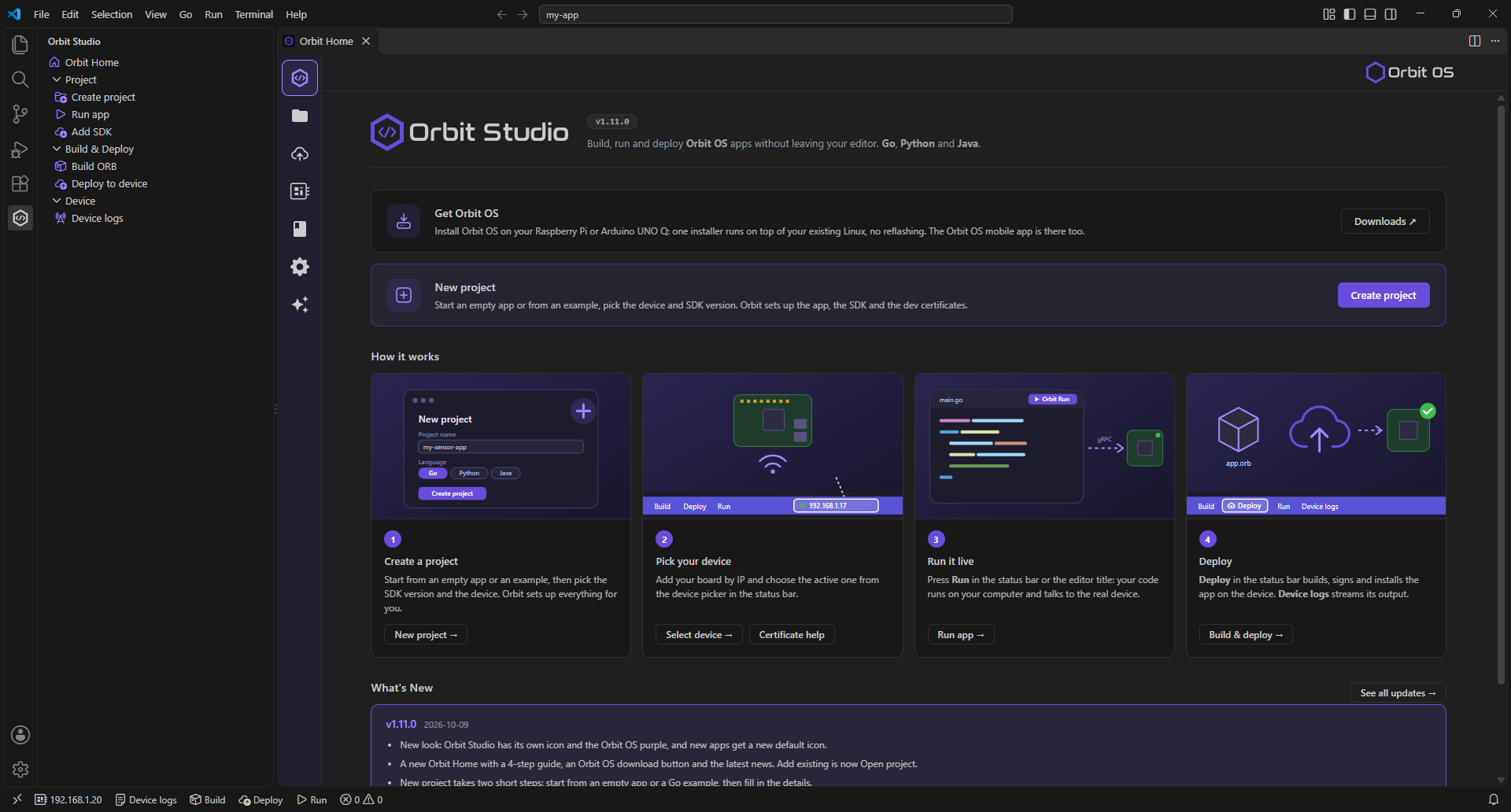
Connect from any machine. Control hardware. In any language.
// Connect — UDS on-device or TCP remotely, same API
device, _ := sdk.NewClientAuto(DEVICE_IP_ADDRESS)
defer device.Close()

// GPIO — set direction and drive a pin high
led := &sdk.GpioPin{Name: "GPIO17"}
device.GpioManager.SetDirection(led, sdk.GPIO_DIR_OUT)
device.GpioManager.SetLevel(led, sdk.GPIO_LEVEL_HIGH)

// PWM — 1 kHz signal at 50% duty cycle
channels, _ := device.PwmManager.ListChannels()
device.PwmManager.SetPwm(channels[0], 0.5, 1000.0)

// UART — open ttyAMA0 at 115200 baud and send a command
port, _ := device.UartManager.Open(sdk.UartConfig{
    Port:     "ttyAMA0",
    Baudrate: 115200,
    DataBits: 8,
    Parity:   sdk.UartParityNone,
    StopBits: sdk.UartStopBits1,
})
port.Write([]byte("AT\r\n"))
port.Close()

// I²C — scan bus and read a sensor register
bus, _  := device.I2CManager.Open(1, 100000, false, false)
data, _ := bus.Transfer(0xA0, []byte{0x00}, 2, 0)

// SPI — open spidev0.0 at 1 MHz and do a full-duplex transfer
spi, _  := device.SpiManager.Open(0, 0, 1000000, 8, 0, false)
data, _ := spi.Transfer([]byte{0xAA, 0xBB}, 2)
// Connect — UDS on-device or TCP remotely, same API
try (Client client = Client.connect(DEVICE_IP_ADDRESS, "my-app")) {

    // GPIO — set direction and drive a pin high
    var led = new GpioManager.GpioPin("GPIO17", 17, 0);
    client.gpioManager().setDirection(led, GpioManager.Direction.OUT);
    client.gpioManager().setLevel(led, GpioManager.Level.HIGH);

    // PWM — 1 kHz signal at 50% duty cycle
    var channels = client.pwmManager().listChannels();
    client.pwmManager().setPwm(channels.get(0), 0.5, 1000.0);

    // UART — open ttyAMA0 at 115200 baud and send a command
    client.uartManager().open(new UartManager.UartConfig(
            "ttyAMA0", 115200, 8,
            UartManager.Parity.NONE, UartManager.StopBits.ONE, UartManager.FlowControl.NONE));
    client.uartManager().write("ttyAMA0", "AT\r\n".getBytes());
    client.uartManager().close("ttyAMA0");

    // I²C — read a sensor register over bus 1
    byte[] data = client.i2cManager().transfer(
            new I2CManager.I2CTransferRequest(1, 0xA0, new byte[]{0x00}, 2));

    // SPI — full-duplex transfer on spidev0.0
    byte[] rx = client.spiManager().transfer(0, 0, new byte[]{(byte) 0xAA, (byte) 0xBB}, 2);
}
# Connect — UDS on-device or TCP remotely, same API
device = Client.connect(DEVICE_IP_ADDRESS)

# GPIO — set direction and drive a pin high
led = GpioPin("GPIO17")
device.gpio_manager.set_direction(led, GpioDirection.OUT)
device.gpio_manager.set_level(led, GpioLevel.HIGH)

# PWM — 1 kHz signal at 50% duty cycle
channels = device.pwm_manager.list_channels()
device.pwm_manager.set_pwm(channels[0], 0.5, 1000.0)

# UART — open ttyAMA0 at 115200 baud and send a command
port = device.uart_manager.open(UartConfig(
    port="ttyAMA0",
    baudrate=115200,
    data_bits=8,
    parity=UartParity.NONE,
    stop_bits=UartStopBits.ONE,
))
port.write(b"AT\r\n")
port.close()

# I²C — open bus and read a sensor register
bus  = device.i2c_manager.open(1, 100000, False, False)
data = bus.transfer(0xA0, bytes([0x00]), 2, 0)

# SPI — open spidev0.0 at 1 MHz and do a full-duplex transfer
spi     = device.spi_manager.open(0, 0, 1_000_000, 8, 0, False)
rx_data = spi.transfer(bytes([0xAA, 0xBB]), 2)

device.close()
// Preview: the C++ SDK is planned for Q4 2026
// Connect — UDS on-device or TCP remotely, same API
auto device = OrbitClient::connect(DEVICE_IP_ADDRESS);

// GPIO — set direction and drive a pin high
GpioPin led("GPIO17");
device->gpio().setDirection(led, GpioDirection::OUTPUT);
device->gpio().setLevel(led, GpioLevel::HIGH);

// PWM — 1 kHz signal at 50% duty cycle
auto channels = device->pwm().listChannels();
device->pwm().setPwm(channels[0], 0.5, 1000.0);

// UART — open ttyAMA0 at 115200 baud and send a command
auto port = device->uart().open(UartConfig{
    .port     = "ttyAMA0",
    .baudrate = 115200,
    .dataBits = 8,
    .parity   = UartParity::NONE,
    .stopBits = UartStopBits::ONE,
});
port->write("AT\r\n");
port->close();

// I²C — open bus and read a sensor register
auto bus  = device->i2c().open(1, 100000, false, false);
auto data = bus->transfer(0xA0, {0x00}, 2, 0);

// SPI — open spidev0.0 at 1 MHz and do a full-duplex transfer
auto spi    = device->spi().open(0, 0, 1000000, 8, 0, false);
auto rxData = spi->transfer({0xAA, 0xBB}, 2);

device->close();
 MCP Server
 Smart Image Detection
 Home Assistant Bridge
 Orbit Connect
 Moquette
 WireShield VPN
 PZEM Monitor
 PortFlux
 Pulse
Pulse
 Orbit Flow
 Mochi MQTT Broker
 RPI 4-Channel Relay